
Close Menu
WordPress ExpertsWordPress Experts
    WordPress ExpertsWordPress Experts
    • Technology
      • AI & Machine Learning
      • Cloud Computing
      • Cybersecurity
      • Software Reviews
    • CRM
      • Freshworks
      • HubSpot
      • Microsoft Dynamics
      • Open Source CRM
      • Salesforce
      • Zoho
    • Programming
      • WordPress
        • WordPress Errors
        • WordPress Themes
        • WordPress Performance
        • WordPress Plugins
        • WordPress SEO
          • Google AdSense
        • Vulnerabilities
        • Responsive WordPress Themes
        • WooCommerce
          • WooCommerce Tips
        • WordPress Security
          • Wordfence
    • Web Development
    • Web Hosting
    • Digital Marketing
    • Contacts
      • Write for Us
    WordPress ExpertsWordPress Experts
    Home»Blog»How to Create a Free Business Email Address to Boost Your Brand
    Blog

    How to Create a Free Business Email Address to Boost Your Brand

    WP Experts TeamBy WP Experts TeamNovember 25, 2025Updated:November 25, 2025No Comments3 Mins Read
    Share Facebook Twitter Pinterest LinkedIn Tumblr Reddit Telegram Email
    Free Business Email Address
    Share
    Facebook Twitter LinkedIn Pinterest Email

    First impressions count in business. If you send an email from a Gmail or Yahoo account, clients might not trust you. A custom address like name@yourbusiness.com looks professional. It shows you are serious about your work.

    Many people think a custom email costs a lot of money every month. This is not true. You can set up a business email for free if you use the right tools.

    Why You Need a Custom Domain Email

    Your email address is like a digital business card. It helps your brand every time you send a message.

    • Trust: Clients trust custom domains more than free ones.

    • Matching: It matches your website and social media.

    • Order: It keeps your work emails separate from personal ones.

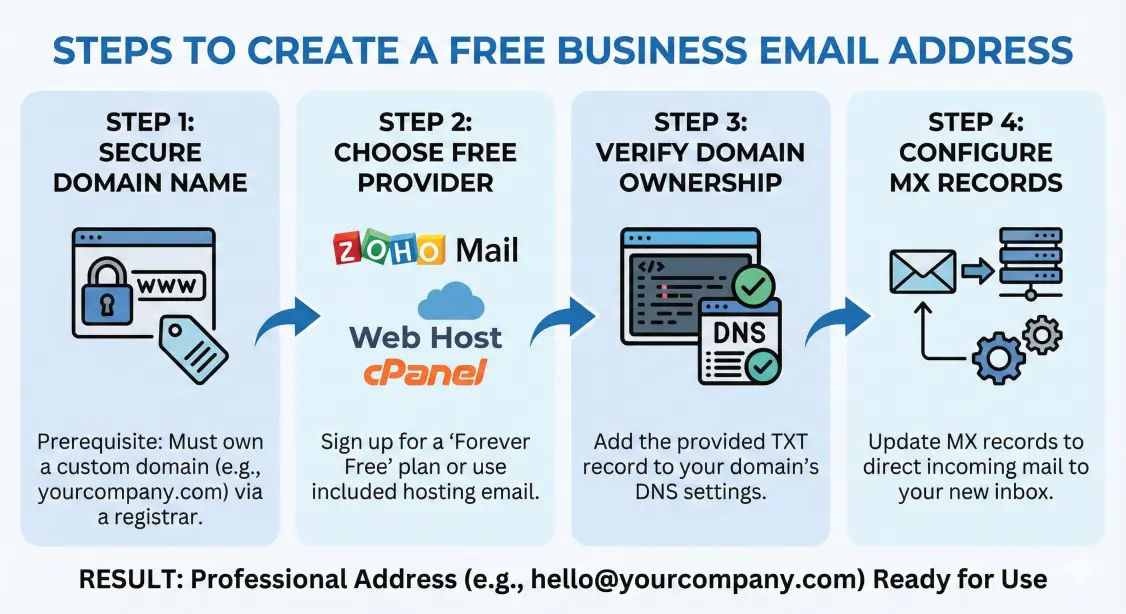
    Step 1: Get Your Domain Name

    First, you need a domain name. This is the .com part of your web address. You cannot make a business email without one. If you have a website, you likely own a domain already. If not, you must buy one.

    Step 2: Choose a Free Email Service

    Next, you need a service to hold your emails. Google and Microsoft charge fees. However, other companies have free plans for small teams.

    Zoho Mail is a top choice. They have a “Forever Free” plan for up to five people. This lets you check business email on the web without ads.

    Web Hosting (Bluehost or SiteGround): If you pay for website hosting, check your account. Most hosts give you free email accounts. You just log in and create a new user.

    Step 3: Verify Your Domain

    To start using your email, you must prove you own the domain. You do this by changing your DNS settings.

    You need to add specific codes (called TXT or CNAME records) to your settings. Your email provider gives you these codes. Once you paste them in, your email starts working.

    Connecting Email to Your Website

    After your inbox is ready, connect it to your website. This makes sure contact forms and alerts reach you.

    Sometimes, website servers do not send emails well. Messages often go to spam folders. If your site stops sending alerts, check your SMTP settings. You must learn how to fix WordPress not sending email issue to keep lines open. Proper settings send your emails through a trusted server. This stops them from becoming junk mail.

    When to Ask for Help

    Changing DNS records and server settings can be scary. One wrong click might break your website.

    If you want to focus on sales instead of tech problems, hire an expert. A skilled team offers wordpress consulting and solution services. They can set up your domain and email for you. They ensure your website runs fast and without errors.

    Conclusion

    A professional email address is a small change with big rewards. It improves your image and builds trust. You can use a free service like Zoho or your web host. The effort is worth it. Take charge of your business emails today.

    Share. Facebook Twitter Pinterest LinkedIn Tumblr Email
    Previous ArticleHow to Easily Import Google Docs to WordPress
    Next Article How to Connect WordPress to Salesforce: A Step-by-Step Guide for 2025
    WP Experts Team
    • Website

    As a global digital solutions partner, we empower businesses with integrated technology platforms. We specialize in crafting high-performance WordPress websites—from custom design and SEO-optimized content to robust e-commerce. Furthermore, we unlock growth by implementing and optimizing Salesforce, streamlining your CRM, and automating sales and service processes. From your digital storefront to your customer relationships, we provide end-to-end solutions to achieve your online goals.

    Related Posts

    Blog

    Website Design Services in Goa: Grow Your Business Online

    December 17, 2025
    Blog

    Write for Us – Submit Guest Post (Technology, WordPress, CRM & AI)

    December 2, 2025
    Blog

    How to Easily Import Google Docs to WordPress

    November 20, 2025
    Add A Comment

    Comments are closed.

    fix hacked wordpress websites and remove malware
    fix wordpress issues
    create a wordpress website with elementor
    fix woocommerce issues and customize theme
    migrate or clone wordpress site to new host or domain
    Top Articles

    The 5 Best Selling WordPress Themes for 2025: A Complete Guide

    December 19, 2025

    Beginner’s Guide to Troubleshooting WordPress Errors

    December 19, 2025

    How to Fix Common Image Issues in WordPress

    December 19, 2025

    How to Fix the 500 Internal Server Error on Your WordPress Website

    December 19, 2025
    • Client Experiences
    • WordPress Forms
    • Page Builder Services
    • Woocommerce
    • WordPress Migration Services
    • WordPress Maintenance & Support
    • Fix Hacked WordPress Site
    • WordPress LMS Development
    © 2025 WordPress Experts All rights reserved

    Type above and press Enter to search. Press Esc to cancel.